现在使用的Mirages主题外观已经很好看了,但是总觉得缺少些什么,就开始魔改啦~
#壹。在页脚提示本站运行了多少天
在主题目录找到/Mirages/component/footer.php文件。下拉找到约第63行)。下面就是要修改的内容啦。
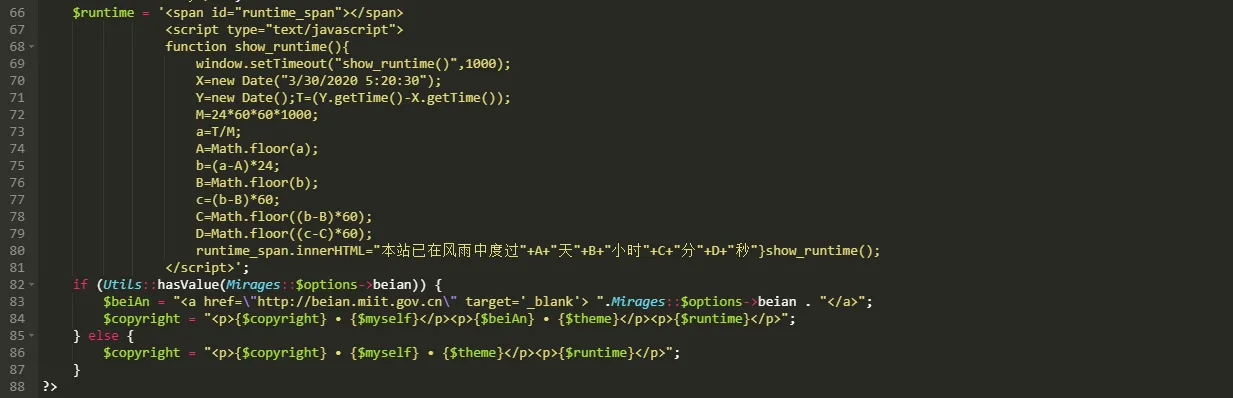
$runtime = '<span id="runtime_span"></span><script type="text/javascript">function show_runtime(){window.setTimeout("show_runtime()",1000);X=new Date("3/30/2020 5:20:30");Y=new Date();T=(Y.getTime()-X.getTime());M=2460601000;a=T/M;A=Math.floor(a);b=(a-A)24;B=Math.floor(b);c=(b-B)60;C=Math.floor((b-B)60);D=Math.floor((c-C)*60);runtime_span.innerHTML="本站已在风雨中度过"+A+"天"+B+"小时"+C+"分"+D+"秒"}show_runtime();</script>';
这段代码
在X=new Date("3/30/2020 5:20:30");中,引号里面的填写你建站的时间,格式要按照 月/日/年 时:分:秒 进行修改哦~接下来就是要调用这串代码啦

像是图中所展示的那样在{$theme}</p>后面添加<p>{$runtime}</p> ,一定要记得放在引号里面哦,然后保存,就大功告成了!具体效果可以参照本站的页脚~整体代码:
#贰。大,一定要大一点!加大了字号还有加宽了顶部菜单栏
在主题设置里的自定义css中加了css样式
<style type="text/css">.navbar{opacity: 0.85;padding: 0.438rem;}
@media screen and (min-width: 768px) {html{font-size: 18px;}}</style>
看到天空Blond写的文章所受到的启发,想着是要把字放大一点了。如果觉得不喜欢大字的话可以在顶部菜单栏右边或在左侧侧边栏下方找到大大的A按钮点进去修改页面大小的百分比。
加大了代码行宽和文章显示宽度
又在网上冲浪的时候看到一篇大佬发的文章《修改 Mirages 主题文章布局》觉得也要改一改了。(不过个人觉得以后会换回去)
<style type="text/css" >#footer {font-size: 0.9rem;line-height: 30px;}
.post-content,.post-content ul li{font-size: 1.2em !important;}
.post-content code {font-size: 0.9em !important;}
.comment-content pre code ul {font-size: 1.03em !important;}
.post-content pre {line-height: 1.97em !important;}
@media screen and (min-width: 768px) and (max-width: 1250px) {.container {max-width: 740px}}
@media screen and (min-width: 1251px) and (max-width: 1599px) {.container {max-width: 985px;}
}
@media screen and (min-width: 1600px) and (max-width: 1799px) {.container {max-width: 1400px}}
@media screen and (min-width: 1800px) and (max-width: 1919px) {.container {max-width: 1500px}}
@media screen and (min-width: 1920px) and (max-width: 2399px) {.container {max-width: 1600px}}
@media screen and (min-width: 2400px) {.container {max-width: 1900px}}
@media screen and (min-width: 768px) and (max-width: 1301px) {
body.serif-fonts .container,body.content-lang-en .container {max-width: 900px}}</style>
加入这串代码即可
#叁。添加了评论邮箱提醒
使用了CommentToMail插件,在翻主题源码的时候无意发现了在评论区已引用了是否开启邮件提醒的代码,便找到了这款插件。
启用,填写,更改邮件html样式,保存,测试,成功!
##肆。对,还是关于评论。因为谷歌收录了我的网站的缘故<del>(吐槽一句,谷歌收录的速度不是百度能比拟的)</del>最近经常收到来自国外的长篇英文评论,多数是推广他们SEO优化等,很是烦恼,又不想关闭评论,也不想添加评论审核,就去找插件。添加了反垃圾评论插件
在网上冲浪的时候发现了一款插件[SmartSpam][5]。
能够设置的内容挺多,可以设置屏蔽ip段内的评论、邮箱关键词、网址关键词、昵称关键词、昵称长度、评论字符数、评论关键词。
经过测试,还挺好滴。感谢大佬。
#伍。添加了自己的表情包
日逛B站看到表情包都挺可爱,寒酸地看了我站的表情包,只有3种!下定决心要添加表情包。
得到B站表情包后,整理一下。找到主题官方文档,发现贴心地给了我们如何正确添加表情包的方法。按照方法一步一步来,添加成功。就是一个一个输入表情包名称有点烦,苦苦打了200行代码说一下,想要表情包和代码的小伙伴可以联系我邮箱。不过看到有新的漂亮的表情包增加了,还是挺开心滴~
#陆。添加了外链跳转内链插件
用了ShortLinks插件,把评论区的外链转换成内链,并添加了跳转页面,这样点评论者网站的时候就有美美的界面啦~#(呲牙)
#柒。给博客增加了樱花下落的效果
在腾讯云的云社区冲浪的时候发现了这篇文章 原作者GitHub开源代码地址
觉得加一个樱花效果还是挺好看的呐~
于是就复制,粘贴!
<script type="text/javascript">//樱花var system ={};var p = navigator.platform;system.win = p.indexOf("Win") == 0;system.mac = p.indexOf("Mac") == 0;system.x11 = (p == "X11") (p.indexOf("Linux") == 0);if(system.winsystem.mac||system.xll){//如果是电脑
$.getScript("https://cdn.jsdelivr.net/gh/ivampiresp/special-JavaScript/yinghua.js");}else{ //如果是手机
}</script>
直接放到主题外观设置里的自定义 HTML 元素拓展 - 在 body 标签结束前这一栏里就可以啦~#(高兴)手机端我觉得还是不要加这个特效啦~挤在一堆比较不美观。
如果还是想要在手机端访问的话,就用这串代码叭~
<script type="text/javascript">//樱花var system ={};var p = navigator.platform;system.win = p.indexOf("Win") == 0;system.mac = p.indexOf("Mac") == 0;system.x11 = (p == "X11") || (p.indexOf("Linux") == 0);$.getScript("https://cdn.jsdelivr.net/gh/ivampiresp/special-JavaScript/yinghua.js");</script>
#捌。添加自定义公告
<script>// 自定义公告显示document.addEventListener('DOMContentLoaded', initNotice2);
function initNotice2() {const common = {loadResource: function(id, resource, type) {return new Promise(function(resolve, reject) {let loaded = document.head.querySelector('#' + id);if (loaded) {resolve('success: ' + resource);return;}const element = document.createElement(type);element.onload = element.onreadystatechange = () => {if (!loaded && (!element.readyState || /loaded|complete/.test(element.readyState))) {element.onload = element.onreadystatechange = null;loaded = true;resolve('success: ' + resource);}}element.onerror = function() {reject(Error(resource + ' load error!'));};if (type === 'link') {element.rel = 'stylesheet';element.href = resource;} else {element.src = resource;}element.id = id;document.getElementsByTagName('head')[0].appendChild(element);});},loadResources: function() {const initVue = this.initVue;const loadResource = this.loadResource;const host = '//s0.pstatp.com/cdn/expire-1-M/';const resources = ['vue/2.6.10/vue.min.js','element-ui/2.8.2/index.js','element-ui/2.8.2/theme-chalk/index.css'];const loadPromises = [];resources.forEach(resource => {loadPromises.push(loadResource(btoa(resource).replace(/[=+\/]/g, ''), host + resource,({'css': 'link','js': 'script'})[resource.split('.').pop()]));});Promise.all(loadPromises).then(function() {let flag = false;const waitVue = setInterval(() => {if (!flag && typeof Vue === 'function') {flag = true;initVue();clearInterval(waitVue);}}, 100);});},initVue: function() {var blog = new Vue({el: document.createElement('div'),created() {this.sayHello();window.alert = this.alert;},computed: {hello: function() {var hours = (new Date()).getHours()var t if (hours < 5) {t = '凌晨了,注意休息哦!'} else if (hours >= 5 && hours < 8) {t = '早上好,新的一天又是元气满满呢!'} else if (hours >= 8 && hours < 12) {t = '上午好!'} else if (hours === 12) {t = '中午好!'} else if (hours > 12 && hours <= 18) {t = '下午好!'} else if (hours > 18 && hours <= 22) {t = '晚上好!'} else if (hours > 22 && hours < 24) {t = '夜深了,注意休息哦!'}return t}},methods: {alert: function(message, title, type, duration, showClose, offset, onClose) {if (duration !== 0) {duration = 4500;}this.$notify({message: message,type: type 'error',title: title '警告',duration: duration,showClose: showClose false,offset: offset 0,onClose: onClose})},sayHello: function() {setTimeout(() => {this.alert('欢迎光临~', this.hello, 'success');}, 1000);}},})}};common.loadResources();}</script>